.webp)
Introduction: Digital Card Holder vs Digital Wallet - Why Merchants Should Care Now
Merchants face a pivotal choice: build a static digital card holder app that stores IDs or loyalty barcodes, or adopt a dynamic digital wallet strategy that lives natively in Apple Wallet and Google Wallet. The former is essentially a siloed repository; the latter turns the wallet on every customer’s phone into a persistent, high-engagement channel for payments, passes, push notifications, and real-time updates - no app download required.
"Digital wallets accounted for roughly 50% of global e‑commerce transaction value in 2023 and are set to grow further through 2027." - Source
Why this matters now:
Payments acceptance vs lifecycle engagement: A digital card holder helps a customer store a card; a digital wallet strategy can power the entire lifecycle - acquisition (instant sign-up into Apple/Google Wallet), activation (welcome offers on the lock screen), repeat visits (geofenced reminders), and retention (personalized offers and pass updates).
From passive storage to measurable revenue: Wallet solutions built on Apple Wallet and Google Wallet enable dynamic fields, one-tap redemption, and targeted push - driving repeat purchases and enabling attribution down to store, offer, and segment.
Native, scalable, and fast: Because the experience runs in Apple/Google Wallet, merchants can onboard customers in seconds at POS, via QR, or online - no friction, no password resets, and fewer abandoned sign-ups.
What this guide covers:
Clear definitions: digital card holder vs a digital wallet strategy (Apple/Google Wallet passes and payments)
Key differences and the business impact on acquisition, activation, repeat visits, and retention
Real merchant use cases that increase foot traffic, basket size, and visit frequency
ROI mechanics and benchmarks you can bring to leadership
Implementation steps for Apple Wallet and Google Wallet passes - plus how to connect data and notifications
A vendor checklist to evaluate wallet solutions and avoid lock-in
By the end, you’ll know when a basic digital card holder is sufficient, when a digital wallet approach is essential, and how to operationalize Wallet at scale for measurable revenue impact. Loyaltee helps retailers and service brands launch fully branded Apple and Google Wallet passes in minutes - turning every pass into a direct, trackable engagement channel.
Digital Card Holder vs Digital Wallet: Definitions, Differences, and Merchant Implications
What is a digital card holder?
A standalone app or feature that stores static card images or barcodes (e.g., a proprietary loyalty card app or generic card-storage app).
Typically requires downloads, account creation, and manual updates, with limited or no native push capabilities.
Functions as a passive repository rather than an engagement channel.
What is a digital wallet?
A native wallet on the device - Apple Wallet and Google Wallet - that stores passes (loyalty, coupons, memberships, gift cards, tickets) and supports dynamic updates, geo/context triggers, and secure payments.
Passes can be issued or added instantly from QR codes, web, email, SMS, or POS, and then updated via APIs without user intervention.
Enables a two-way engagement channel with lock-screen notifications, geofencing, and real-time personalization - no app download required.
"Apple Wallet passes can be updated in real time and notify users when details change." - Source
Why the difference matters for merchants
Reduce friction, boost adoption: A digital card holder requires app installs; a digital wallet supports instant “Add to Apple/Google Wallet” from your site, checkout, or QR - driving higher opt-ins.
From static to dynamic value: Move beyond static barcodes to live fields (balance, tier, points, offer status) that update automatically, increasing relevance, redemption, and repeat visits.
Turn storage into engagement: Replace one-way storage with two-way, measurable engagement - targeted notifications, geofenced reminders, and scan-ready barcodes/QR at POS tied to attribution.
Faster time-to-value: Wallet solutions accelerate go-live and reduce ongoing maintenance compared to building and supporting a proprietary card-holder app.
Digital Card Holder vs a Digital Wallet - What Changes for Merchants
Capability | Digital Card Holder (app) | Digital Wallet (Apple/Google Wallet) | Merchant Impact |
|---|---|---|---|
Onboarding | Download app, create account, manual card add | One-tap Add to Wallet via web, QR, email, POS | Higher opt-in and conversion at first touch |
Adoption Friction | High (install, permissions) | Low (native, no install) | Larger audience and faster program growth |
Update Model | Static images/barcodes; manual refresh | Server-driven dynamic fields; instant updates | Always-current balances, tiers, and offers |
Notifications | Limited/opt-in app push; often ignored | Native Wallet notifications on lock screen | Timely, high-visibility engagement |
Geofencing | Custom dev, battery impact | Built-in location triggers for passes | Drive footfall at relevant moments |
Personalization | Generic card art | Segment-based fields, offers, and messaging | Higher relevance and redemption rates |
Analytics/Attribution | Basic app metrics | Add-to-Wallet, views, scans, redemptions, offer lift | Full-funnel measurement and ROI clarity |
POS Compatibility | Custom integration to scan app | Scannable barcode/QR; supports NFC payments context | Faster checkout and simpler operations |
Costs/Time-to-Value | Costly build/maintenance; long timelines | Launch in days with templates and APIs | Lower TCO and quicker revenue impact |
Video primer: Passes vs Payments in Wallet
With a wallet-first approach, merchants replace the friction of a standalone digital card holder with a scalable, native engagement channel inside Apple Wallet and Google Wallet. Loyaltee’s wallet solutions help you launch branded loyalty, coupons, and membership passes in minutes, connect real-time data, and automate updates and notifications that drive measurable repeat visits and revenue.
Under the Hood: How Wallet Passes Work (Apple Wallet, Google Wallet)
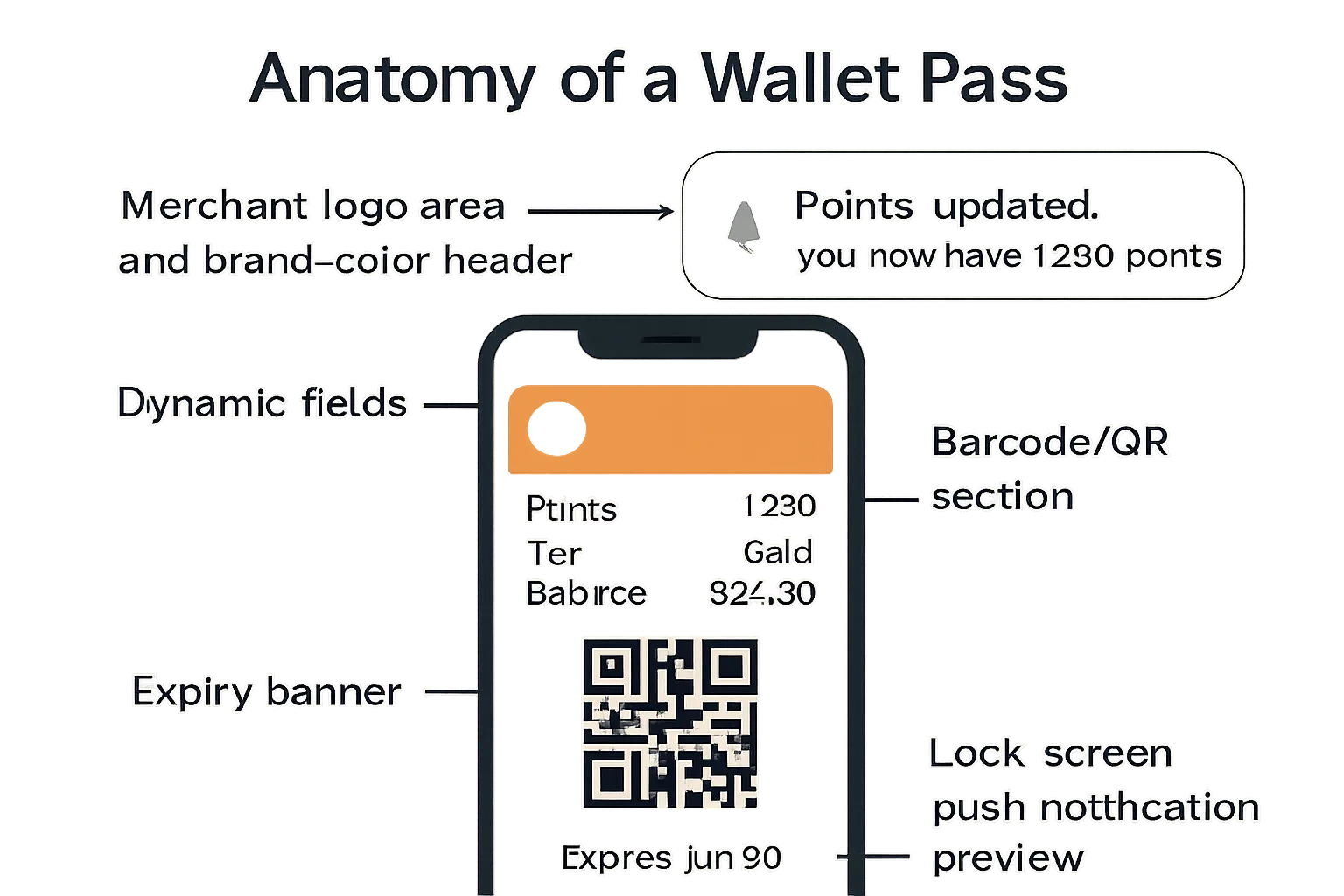
Pass types relevant to merchants
Loyalty and membership passes: track points, tiers, visit counters, and member IDs.
Coupons and vouchers: single-use or multi-use offers with start/end dates, limited quantities, and redemption rules.
Gift cards and stored value: real-time balance, reload options, and transaction summaries.
Event and appointment tickets: seat or time-slot details, check-in status, and venue info.
Dynamic data and real-time updates
Live fields that matter: points balance, tier, expiry, barcode/QR symbology, offer states, and visit counters.
Server-driven updates via APIs: merchants update pass data on their server; Apple Wallet and Google Wallet fetch and refresh instantly - no app updates needed.
Automated triggers: change points after a purchase, flip an offer to “redeemed,” adjust tier on threshold, or decrement a coupon count.
Engagement layer in a digital wallet
Geofenced lock-screen prompts: surface the pass when a customer is near a store or at the right time of day.
Date/time logic: show reminders for upcoming expiries, appointments, or limited-time promotions.
Targeted push notifications: notify when points change, a reward unlocks, or a coupon is about to expire - driving timely action.
Scanning and redemption at POS
Universal barcodes: display 1D (e.g., Code 128) or 2D (e.g., QR, Aztec, PDF417) symbologies for fast scanning.
Value-added services: Apple VAS and Google Smart Tap enable tap-to-identify and pull loyalty via NFC on compatible terminals.
Operational fail-safes: fallback to manual entry of member ID or coupon code if scanners are unavailable.
Privacy and control
Customer-first permissions: users opt in to add a pass and to receive notifications; they can disable alerts or remove the pass at any time.
Device-native security: passes live within Apple Wallet and Google Wallet, benefiting from device encryption, biometrics, and OS-level protections.
Minimal data exposure: only necessary identifiers are stored on the pass; sensitive data remains on secure merchant systems accessible via tokenized references.
Merchant Use Cases: From Static Cards to Wallet-Powered Journeys
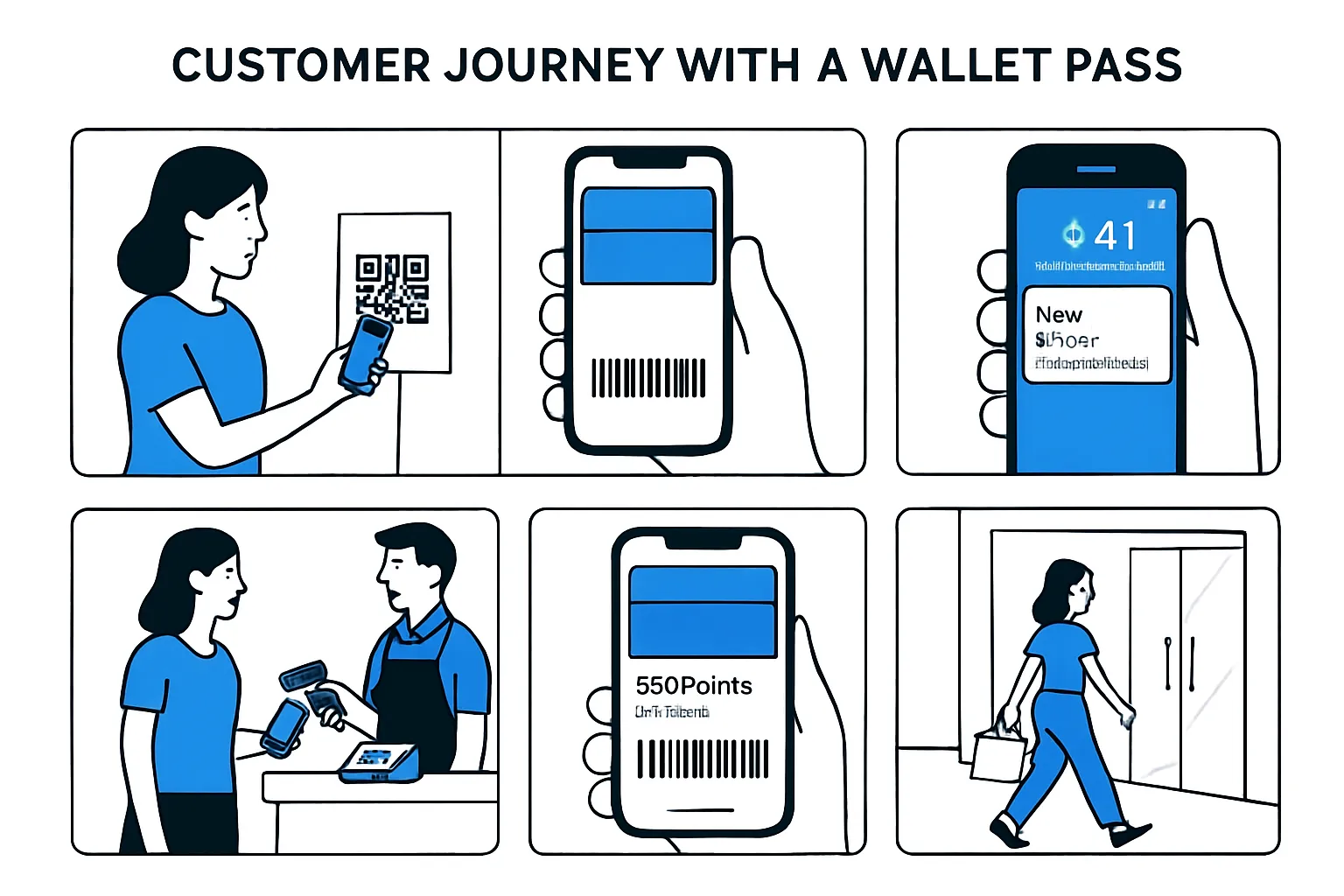
Retail and multi-location brands
Digital loyalty card with instant enrollment, automatic point accrual, tier upgrades, and offer unlocks.
Store finder deep link on the pass plus geofenced prompts that surface on the lock screen near locations.
Hospitality and foodservice (QSR, cafes, restaurants)
Stamp/points cards with rewards that unlock at thresholds.
Daypart targeting (e.g., breakfast push 7–10am), time-bound offers, and flows for table-service or pickup.
Health, beauty, fitness, and memberships
Membership passes with renewal reminders, class credit counters, appointment reminders, and guest passes for referrals.
Promotions and acquisition
“Add to Wallet” placements on website, digital receipts, QR at checkout and signage, email/SMS links, and tap-to-add from social ads.
Post-purchase and retention
Triggered offers after visits (e.g., 7-day bounce-back), replenishment reminders, and surprise-and-delight bonuses for high-value segments.
Mapping use cases to outcomes
Increased repeat visits, higher basket size, reduced churn, and measurable redemptions and ROI attributed to specific passes and offers.
Wallet Use Cases → Revenue Outcomes
Vertical | Wallet Pass Use Case | Trigger/Targeting | Merchant KPI Impact |
|---|---|---|---|
Retail (apparel/beauty) | Loyalty pass with tiered rewards and birthday offer | Add-to-Wallet at checkout; birthday month push | +Repeat visit rate, +AOV, higher offer redemption |
Retail (grocery/convenience) | Weekly coupon wallet with live expiry | Friday morning push; geofence near store | Basket lift, promo sell-through, reduced paper costs |
QSR/cafe | Stamp card (buy X get 1 free) with daypart promos | Morning geofence for breakfast; lunch bounce-back | Visit frequency, daypart mix, margin-friendly upsell |
Restaurant | Pickup-ready offer linked to order-ahead | Push at 11:30am; 2-hour expiry | Order volume, ticket size, throughput at peak |
Beauty/fitness | Membership pass with class credits and referral guest pass | Class pack low threshold; referral share link | Retention, class utilization, new member acquisition |
Health/spa | Appointment reminder pass with add-ons | 24h/2h reminders; post-visit add-on offer | No-shows down, add-on attachment rate up |
Specialty retail | Gift card/stored value with reload prompt | Balance < $10; payday geofence | Reload rate, breakage reduction, revenue predictability |
Omnichannel | Post-purchase bounce-back coupon | Purchase event trigger (POS/ecom); 7-day expiry | Return visit within 14 days, incremental revenue |
Loyaltee helps you operationalize these journeys quickly - issuing branded Apple and Google Wallet passes, automating geofenced and time-based notifications, and syncing real-time balances and offers. The result is a measurable lift in repeat visits, basket size, and retention - without the friction of a standalone app.
From Card Holder Apps to Wallet Solutions: Operational Impact and Team Workflows
Shifting from a static digital card holder to a dynamic digital wallet program changes how teams build, launch, and measure loyalty, coupons, and memberships. Here’s how to operationalize wallet solutions across your organization for speed, scale, and measurable revenue.
Marketing and CRM teams
No-code templates: Build branded pass templates (loyalty, coupons, gift cards, memberships) with logos, colors, and dynamic fields (points, tier, balance, expiry). Duplicate templates for regions/brands without dev work.
Audience segmentation: Target by lifecycle and behavior - newly enrolled, lapsed, high-value, daypart, location radius, tier thresholds, and product affinities.
Campaign orchestration:
Schedule pass updates (e.g., “Bonus points weekend,” “Tier upgrade,” “Limited-time coupon”).
Trigger flows: post-purchase bounce-back, birthday month, low balance reload, last-visit > 30 days.
Geofenced nudges near stores; date/time prompts for dayparts.
Creative and offer testing: A/B test barcode placement, color themes, and copy in dynamic fields. Compare fixed discount vs. threshold offers (e.g., $10 off $50).
Measurement and attribution: Track add-to-wallet rate, pass views, scans, redemptions, geofence notification engagement, repeat visits, AOV, and incremental revenue. Tie outcomes to source (QR at POS, email, social ad, web).
CRM integration: Sync member IDs, points, tiers, and offer eligibility; write back redemptions and visit counters to profiles for next-best-action.
Store operations
Cashier enablement:
Quick reference guide: where customers find the pass (Apple/Google Wallet), how to scan, and what to do if the device is locked or dimmed.
Supported symbologies: ensure scanners read Code 128/39 (1D) and QR/PDF417/Aztec (2D). Test glare and screen brightness.
POS workflows:
Loyalty attach: scan pass before basket total to ensure accrual and targeted offers.
Coupon redemption: scan/validate; system flips offer to redeemed and updates pass state in real time.
Fallback procedures:
Manual entry of member ID or coupon code on POS if scanning fails.
Paper or printed QR backup for edge cases (low battery).
In-store acquisition:
Countertop and door signage with Add-to-Wallet QR.
Receipts and bag stuffers with pass QR and offer hook (“Add now, get 10% off today”).
IT/Integrations
Data flows and APIs:
Real-time balance/points: POS/ecommerce posts accruals and redemptions to wallet API; wallet issues push updates.
Offer state machine: issue → active → redeemed → expired; webhooks notify CRM and analytics.
Member identity: map wallet pass serial to customer ID; tokenized references only on-pass.
Middleware and reliability:
Retry and idempotency for event posting.
Queueing for offline stores; process upon reconnection.
Security and access:
Role-based access for marketers vs. developers.
Rotate API keys, enforce least privilege, and monitor for anomalies.
Testing and environments:
Sandbox passes for QA; test scanners across device models and OS versions.
Load test notification bursts (e.g., national promo).
Legal/compliance
Consent and transparency:
Clear opt-in language for Add-to-Wallet and notifications; link to privacy policy and terms.
Explain data usage for personalization and geofencing.
Data minimization and retention:
Store only necessary identifiers on passes; sensitive data kept server-side.
Define pass data retention and auto-expiry policies (e.g., 18 months of inactivity).
Opt-out mechanics:
Users can disable notifications or remove pass at any time; reflect deletions in CRM suppression lists.
Regional requirements:
Align with GDPR/CCPA/PCI where applicable; document DPIAs for geofenced campaigns.
Change management
Pilot approach:
Start with 3–5 stores and a single vertical (e.g., loyalty pass + bounce-back coupon).
Primary KPIs: add-to-wallet rate, scan rate, redemption rate, visit frequency, AOV, and incremental revenue vs. control.
Iterate and scale:
Optimize barcode placement, offer thresholds, and geofence radii.
Expand to more stores/brands once KPIs validate; templatize SOPs.
Training cadence:
Pre-launch briefings and micro-learning videos.
Weekly field feedback loop; log scanner issues and customer questions.
Budget and timeline
Faster time-to-value:
Template-driven launch in days, not months - no app build or app store cycles.
Lower TCO vs. proprietary card holder apps; fewer maintenance dependencies.
Cost drivers to plan:
Wallet platform licensing, API calls, notification volume, barcode symbology support.
Scanner firmware updates (if needed), in-store signage, and light training.
ROI levers:
Higher enrollment via frictionless Add-to-Wallet.
Lift in repeat visits and basket size through timely, personalized offers.
Reduced paper/plastic costs and clearer attribution.
Loyaltee unifies marketing, store ops, and IT with templates, APIs, and real-time analytics - so your teams can design wallet solutions, automate updates and geofenced notifications, and prove revenue impact without building another app.
Security, Privacy, and Compliance: What Changes With a Digital Wallet Strategy
"Apple Pay doesn’t store card numbers on the device or on Apple servers; a unique Device Account Number is used and stored securely." - Source
Built-in safeguards of a digital wallet
Device-level security: Wallet passes live inside Apple Wallet and Google Wallet, benefiting from OS-level protections and encrypted storage.
Biometric unlock: Access and payments can require Face ID/Touch ID or Android biometrics, reducing unauthorized use.
Tokenization for payments: Payment credentials are tokenized, replacing primary account numbers (PANs) with device-specific tokens.
Secure elements (where applicable): Sensitive payment tokens can be stored in a Secure Element, isolating them from the main OS.
Pass data vs payment data
Separation of concerns: Wallet passes (loyalty, coupons, memberships) store non-payment fields like offers, points, tiers, and expiry. These are distinct from payment credentials.
Lower compliance burden for passes: You don’t handle PANs to run wallet passes; store only necessary identifiers (e.g., member ID, barcode token) and keep sensitive data server-side.
Scoped permissions: Customers opt in to add passes and receive notifications; merchants can update pass fields via secure APIs without collecting excess personal data.
Regulatory considerations
PCI-DSS: Required only if you process or store payment data or accept card-not-present credentials via your systems; running non-payment wallet passes typically does not trigger PCI scope for PANs.
Privacy regulations (GDPR/CCPA): Provide clear notice and purpose for geofencing and personalization; honor access/erasure requests and maintain data mapping for pass identifiers.
Consent logs: Capture timestamped consent for Add-to-Wallet and notifications; record opt-outs and ensure suppression across systems.
Data minimization: Keep only what is needed on the pass; rotate identifiers and limit retention windows for stale passes.
Secure webhooks and APIs: Enforce mTLS or token-based auth, IP allowlists, replay protection, and least-privilege roles for wallet integrations.
Risk management
Abuse and fraud controls:
Unique barcode/QR per pass; rotate tokens on redemption or at intervals.
Single-use or limited-use offers with server-side validation and expiry windows.
Throttling on redemptions and API calls; per-device and per-account limits.
Context checks:
Location proximity and time-bound validations for offers (e.g., must be within X meters of store and active between 11am–2pm).
Device hygiene signals (e.g., excessive failed scans, abnormal velocity).
Operational safeguards:
Real-time revocation: mark passes invalid or revoke offers on suspicious activity.
Audit trails: immutable logs for pass issuance, updates, redemptions, and notification sends.
Incident playbooks: predefined steps for compromised codes, vendor outages, or misconfigured offers.
Adopting a digital wallet strategy lets merchants leverage strong native security while keeping pass programs out of scope for card data handling. With clear consent practices, minimal data on the pass, and robust server-side validation, you can deliver personalized engagement with lower risk and cleaner compliance.
Proving ROI: KPIs, Experiments, and Attribution You Can Trust
Turning a static digital card holder into a dynamic digital wallet program is only as valuable as the revenue you can prove. Here’s a practical framework to quantify impact across the funnel - so Marketing, Ops, and Finance align on what’s working, what to scale, and what to cut.
Core KPIs to monitor
Acquisition and reach
Add-to-Wallet conversion rate (by source: web, QR at POS, email/SMS)
Active passes (30/60/90-day) and pass churn
Engagement and intent
Notification impressions, opens/taps, and on-pass offer views
Geofence-triggered surface rate (passes shown on lock screen near stores)
Commerce outcomes
Redemptions (rate, velocity to first redemption, multi-redemption rate)
Visits per customer and visit frequency uplift vs control/holdout
Average order value (AOV) and Units per Transaction (UPT)
Incremental revenue per pass and total incremental revenue
Customer value
Retention/churn (30/60/90-day active rate post-enrollment)
LTV shift for wallet-enrolled vs non-enrolled cohorts
CAC-to-LTV ratio and payback period
Reliability
Scan success rate at POS, barcode read errors, and latency for real-time updates
Helpful formulas:
Add-to-Wallet conversion = Passes added / Eligible impressions
Incremental revenue = (Treatment revenue − Control baseline) adjusted for traffic mix
Incremental margin = Incremental revenue × Gross margin %
ROI = (Incremental margin − Program costs) / Program costs
Experiment design
Define the hypothesis before launch
Example: “A geofenced push 500m around stores at 11:30am increases lunch redemptions by 15% vs no push.”
Randomize and control
Use holdout groups at the customer or store level; avoid overlapping campaigns that contaminate results.
For multi-location brands, rotate treatments by matched store pairs for clean comparisons.
Variables to test (A/B or multivariate)
Offer value/structure: fixed $ off vs threshold spend; single-use vs multi-use
Message and creative: headline, urgency copy, pass color cues, CTA placement
Timing and cadence: send windows, daypart targeting, frequency caps
Geofence radius and dwell time: 100–500m, immediate vs delayed prompts
Segmentation: new vs lapsed; tier; proximity; product affinity
Run length and power
Run through at least one full purchase cycle (often 2–4 weeks for QSR/retail; longer for low-frequency categories).
Pre-set minimum sample sizes; stop only when you’ve hit power targets, not just early wins.
Attribution model
Deterministic link to sales
Scan-based: tie POS transactions to the pass ID (serial/member ID barcode) to attribute redemptions and basket lift.
Non-coupon influence: attribute “assistant” impact when a pass is shown or a geofence push is opened within a defined window before purchase.
Incrementality over vanity
Use matched control groups (customer- or store-level) to isolate incremental visits and revenue vs baseline.
Difference-in-differences: compare pre/post shifts in treatment vs control locations to reduce bias from seasonality or promotions.
Full-cost accounting
Program costs: wallet platform, creative, notifications, engineering/integration, scanner/firmware updates, signage.
Offer/discount cost: treat discounts as cost of goods sold (COGS) in margin calculations.
Finance-ready metrics
CAC-to-LTV: total acquisition cost per pass add vs resulting incremental LTV over 6–12 months.
Payback period: time for incremental margin to cover program and discount costs.
Reporting cadence
Daily (Store Ops)
Scans, redemption success rate, barcode read errors, top locations, hour-of-day trends.
Weekly (Marketing/CRM)
Add-to-Wallet by source, notification opens, geofence surfaces, offer performance, segment comparisons, early incrementality reads.
Monthly (Leadership/Finance)
Incremental revenue and margin, ROI, CAC-to-LTV, payback, retention deltas, top-performing journeys, and next quarter roadmap.
Quarterly (Strategy)
Cohort LTV analysis, tier migration, long-term retention impact, and cross-channel halo (email/SMS lift from wallet-enrolled users).
Benchmarks and expectations
First 30–90 days goals to align on (calibrate by vertical and traffic mix)
Add-to-Wallet conversion: aim for strong double-digit rates on high-intent surfaces (e.g., checkout and POS QR) and steady growth from email/SMS/social.
Notification engagement: wallet notifications commonly achieve high open visibility; target 50%+ impressions-on-lock-screen and strong tap-through on timely offers.
Time-to-first redemption: target a meaningful share of new passes redeeming within 7–14 days via a bounce-back or welcome incentive.
Incrementality: set initial lift targets (e.g., visit frequency +5–10% vs control; AOV +3–5%) and adjust after first pilot.
Retention: measure 30/60/90-day active rates; aim for wallet-enrolled cohorts to outperform non-enrolled peers.
Iterate quickly
Kill underperforming geofence radii, tighten frequency caps, refine offer thresholds, and optimize pass layout (barcode placement, color contrast for scanners).
Scale what works chain-wide with templated campaigns and guardrails.
Loyaltee gives you the instrumentation to make this simple: deterministic pass-to-sale matching, cohort/holdout testing, geofenced and time-based notification controls, and executive-ready ROI dashboards. With a wallet-first approach - not just a digital card holder - you’ll prove measurable uplift in repeat visits, basket size, and retention you can take to the CFO.
Implementation Blueprint with Loyaltee: From Zero to Wallet in Days
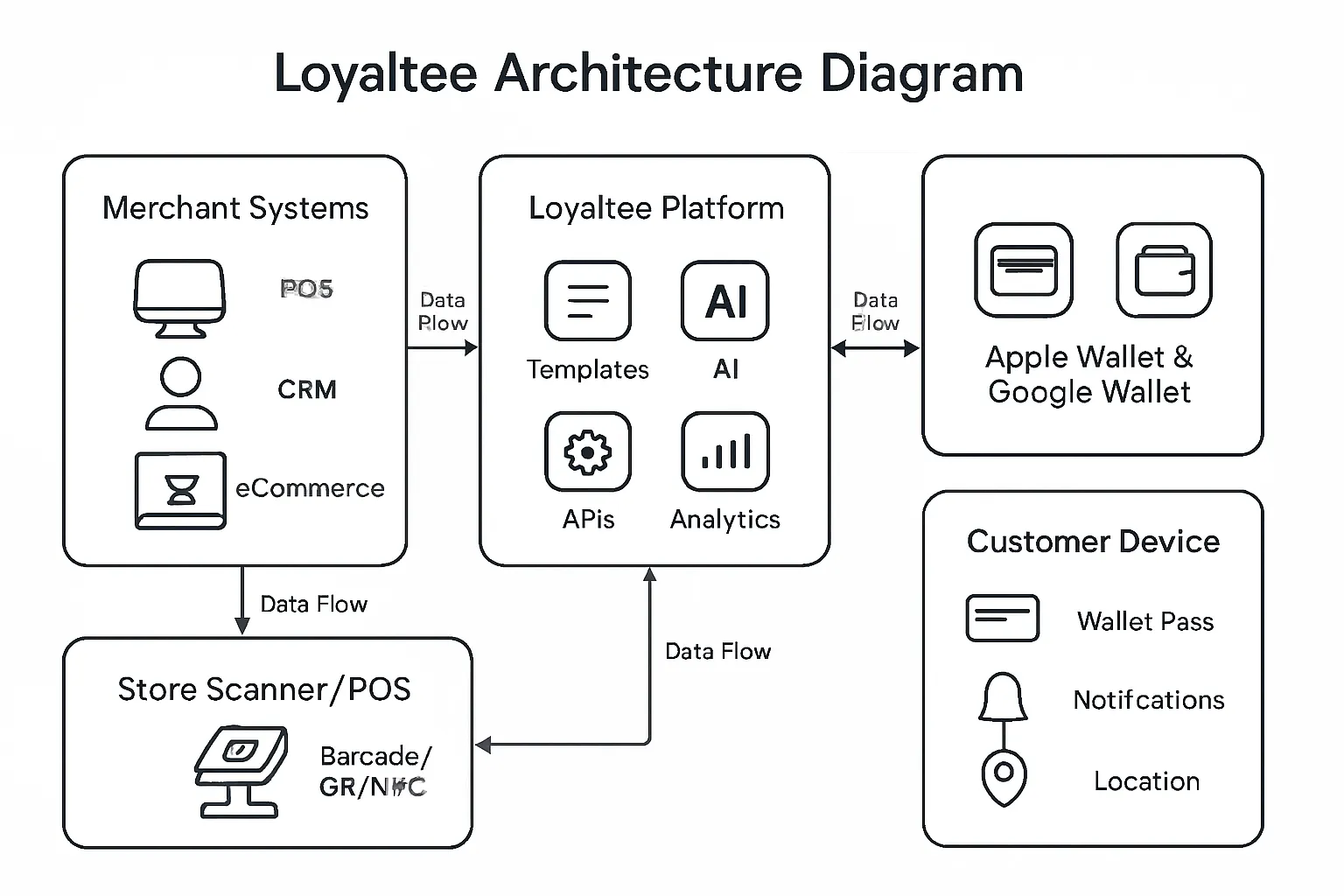
Why choose Loyaltee as your wallet solution
Frictionless onboarding: One-tap Add to Apple Wallet and Google Wallet - no app to download.
Fully branded passes: Control logos, colors, and layouts with dynamic fields (points, tiers, balances, expiry).
Targeted push and geofencing: Trigger lock-screen prompts by location, time, and behavior.
Measurable data: Track add-to-wallet, scans, redemptions, repeat visits, AOV, and ROI - down to store and segment.
Developer-friendly: APIs and webhooks for real-time updates and notifications; enterprise-grade integration options.
Step-by-step rollout
Choose pass templates
Select from loyalty, coupon, voucher, and membership templates. Apply brand assets and layouts.
Configure dynamic fields
Points, tier, expiry, visit counters, and unique barcodes/QR; set rule-based change messages.
Connect data sources
Link POS, CRM, and eCommerce; configure REST APIs/webhooks for real-time accruals, redemptions, and pass updates.
Launch Add-to-Wallet entry points
Website buttons, in-store QR codes at POS/signage, links in email/SMS, and tap-to-add from social ads or order confirmations.
Train staff; validate scanning
Ensure scanners read 1D/2D barcodes; confirm redemption states update instantly; document fallback steps.
Go live with a pilot; measure; scale
Start in a few locations, monitor add-to-wallet, scans, redemptions, and visit frequency; iterate offers and geofences; roll out chain-wide.
Integration and developer options
REST APIs for pass issuance, updates, and balance changes; webhooks for redemption events and lifecycle updates.
SDKs and reference connectors for common POS/CRM systems; middleware patterns for legacy environments.
Security controls: role-based access, key rotation, IP allowlists, mTLS support, audit logs.
Pricing and scalability
Transparent pricing tiers from SMB to enterprise - pay for usage, not shelfware.
Scales from single-store pilots to multi-country rollouts without re-architecture.
Eco-friendly alternative to plastic cards and printed coupons - lower cost and reduced waste.
Fast time-to-value: launch in days with templates and prebuilt integrations; prove ROI before expanding.
With Loyaltee, you turn Apple and Google Wallet into a revenue channel fast - no heavy app build, just branded passes, real-time data, and notifications that drive measurable repeat visits and basket size.
Vendor Checklist and Common Pitfalls to Avoid
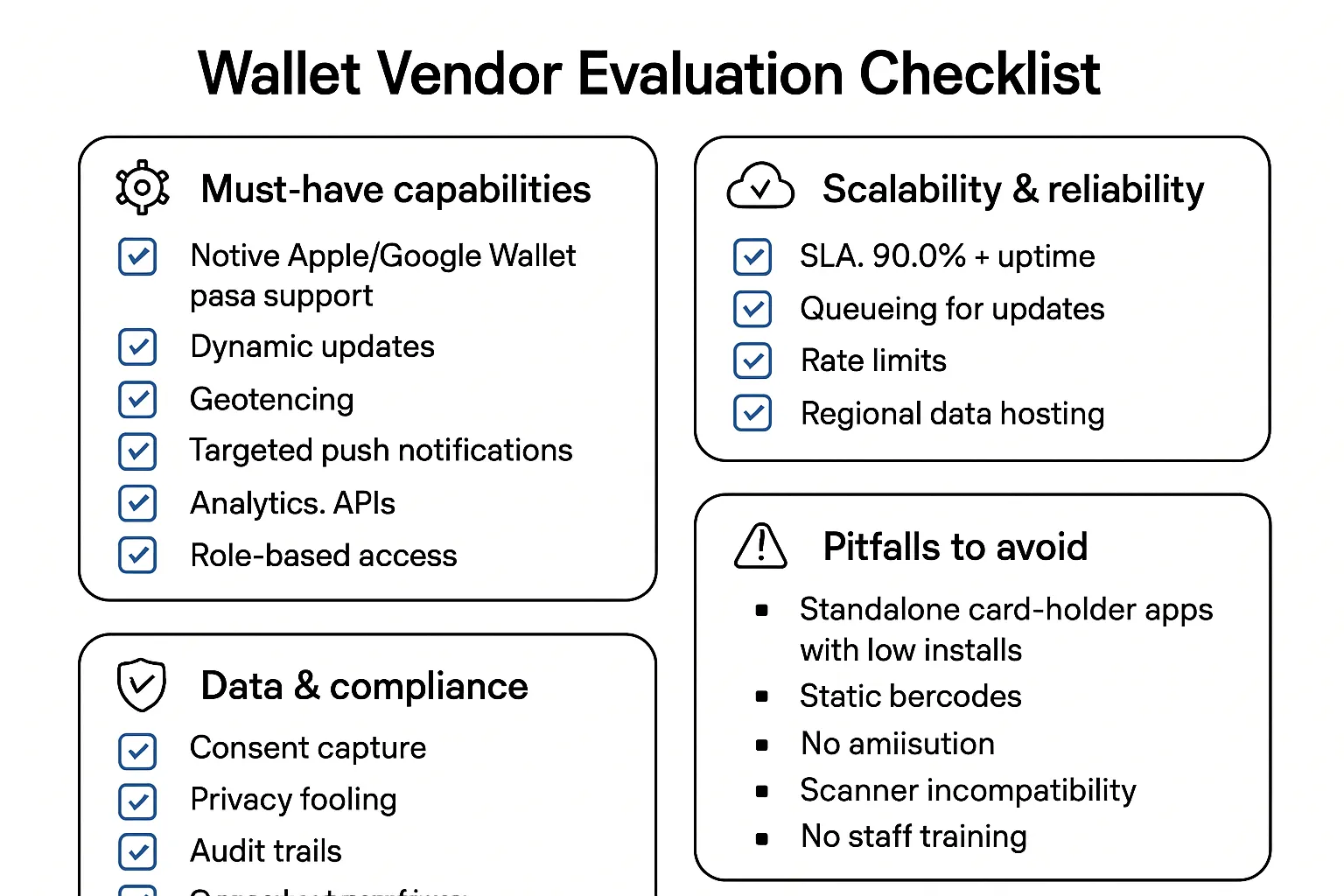
Must-have capabilities
Native Apple/Google Wallet pass support: loyalty, coupons, memberships, gift cards, and tickets.
Dynamic updates and personalization: real-time points, tiers, balances, expiry, and offer states.
Geofencing and targeted push: lock-screen surfacing and contextual prompts.
Analytics and attribution: add-to-wallet, views, scans, redemptions, incremental lift by segment and store.
APIs and webhooks: issuance, updates, redemption events; developer docs and SDKs.
Role-based access: marketer vs. developer permissions, audit logs.
Scalability and reliability
SLA and uptime: 99.9%+ target with transparent status page and incident comms.
Queueing and retries: resilient pipelines for pass updates and notifications.
Rate limits and quotas: protect stability during national promos.
Regional data hosting: align with data residency requirements and latency needs.
Data and compliance
Consent capture and privacy tooling: clear opt-in/opt-out with suppression lists.
Audit trails: immutable logs for pass issuance, updates, redemptions, and notifications.
Secure integrations: mTLS or token auth, IP allowlists, key rotation.
Security posture: SOC 2/ISO 27001 readiness, regular pen tests, vulnerability management.
Avoid these pitfalls
Building a card-holder app few customers install; high friction and low reach.
Static barcodes with no dynamic updates or offer state changes.
No attribution beyond “scanned”: missing incrementality and ROI proof.
Poor scanner compatibility or unreadable barcodes on certain devices.
Ignoring staff training and fallback procedures at POS.
Why Loyaltee checks the boxes
Purpose-built for wallet marketing and loyalty with native Apple/Google Wallet support.
Proven engagement mechanics: dynamic fields, geofencing, targeted push.
Measurable outcomes: attribution from pass ID to POS sale, cohort testing, and ROI dashboards.
Developer-friendly APIs and webhooks, robust security controls, and transparent pricing from SMB to enterprise.
Conclusion: Turn Wallets Into a Revenue Channel with Loyaltee
Card holder apps are static, high-friction, and hard to scale. In contrast, a digital wallet strategy built on Apple Wallet and Google Wallet delivers dynamic, measurable engagement: instant Add to Wallet, real-time pass updates, geofenced prompts, and targeted push notifications that turn everyday interactions into repeat visits and revenue. In short, moving from a digital card holder to a true wallet solution unlocks lifecycle engagement - acquisition, activation, repeat visits, and retention - with attribution you can take to the CFO.
The business case is clear:
Faster onboarding: no app to download, one-tap Add to Wallet across web, POS, email/SMS, and social.
Higher engagement: live fields (points, tiers, balances, offers) and timely notifications drive redemption and visit frequency.
Clearer attribution: tie pass scans and offers to POS transactions for trustworthy ROI and LTV insights.
Start with Loyaltee to launch fully branded wallet passes in days - not months. Our platform automates real-time updates and push notifications, connects to your POS/CRM, and provides the analytics to prove incremental revenue. Turn Apple Wallet and Google Wallet into a direct, persistent revenue channel.
Learn more and book a demo: https://loyaltee.xyz/