.webp)
Overview: Samsung Wallet availability, devices, and what’s new
If you’re evaluating the Samsung version of Wallet for customer engagement, here’s the up-to-date view. This section consolidates the latest on Samsung Wallet availability by country, supported devices and OS versions on Galaxy and Wear OS, and where key features like payments, transit, digital IDs, and car/home keys are live. You’ll also find how to perform a Samsung Wallet update if the app is missing, plus a simple way to launch Wallet passes that work across both Samsung Wallet and Google Wallet using Loyaltee.
"As of 2025, Samsung Wallet is available in 30+ markets worldwide." - Source
Who this is for:
Retail, hospitality, fitness, and multi-location brands assessing Samsung Wallet as an app-free channel for loyalty, offers, and membership.
Marketing leaders who need a reliable, current reference on coverage and requirements.
IT and operations teams planning deployments across devices, stores, and regions.
What you’ll learn:
Samsung Wallet availability by country/region (2025)
Device and OS requirements (Galaxy + Wear OS)
Regional feature rollout: payments, transit, IDs, car/home keys
How to update if Samsung Wallet is missing
How to launch Wallet passes for Samsung Wallet and Google Wallet with Loyaltee
At a glance: availability and rollout highlights
Broad market coverage across North America (U.S., Canada), Europe (including the Nordics, DACH, France, Spain, Italy, UK, Benelux), the Middle East (UAE, Qatar, Kuwait, Oman, Bahrain), Asia (Korea, China, Hong Kong, India, Malaysia, Singapore, Taiwan, Vietnam), South America (Brazil), and Oceania (Australia; New Zealand where supported).
2024–2025 feature expansions include transit integrations (e.g., Navigo/Île-de-France Mobilités support in France) and broader boarding pass support with select airlines. In early 2025, Samsung announced availability in the Benelux region, coinciding with newer One UI builds.
Feature availability remains region- and issuer-specific: some transit cards, IDs, and digital keys are limited to select countries and compatible devices.
Supported devices and OS requirements
Galaxy phones: Android-based Samsung Galaxy devices with NFC. For the best experience and the latest feature set, ensure you’re on a recent One UI version. Some new regional launches in 2025 initially target One UI 7 capable devices, with broader device updates following.
Wearables: Galaxy Watch on Wear OS (Watch6 and later) supports Wallet passes, with partial feature parity compared to phones. Payments, memberships, and boarding passes are supported; certain features like digital car/home keys may be phone-only.
Security: Samsung Knox underpins Wallet security with hardware-backed protections, biometric authentication, and isolated storage for sensitive credentials.
Regional feature rollout snapshot
Payments: Widely available in supported markets with bank and network coverage varying by country.
Transit: Region-specific. Examples include:
France: Navigo via Île-de-France Mobilités for Paris region riders, plus tap-to-pay support in multiple cities for open-loop payments.
Hong Kong: Octopus support is region-locked to devices set up for Hong Kong.
UK/US and other regions: Tap-to-pay on open-loop systems where EMV payments are accepted.
Digital IDs: Rolling out market-by-market. In the U.S., select states support mobile driver’s licenses in Samsung Wallet. Other government credentials are available in specific regions (e.g., Korea, Dubai).
Digital car/home keys: Available on select car models and compatible Galaxy devices (with NFC/UWB support depending on the manufacturer and model). Availability is region-, car-, and device-specific.
How to perform a Samsung Wallet update (or install if it’s missing)
Step 1: Check your device and region
Confirm your Galaxy device has NFC and is signed into a Samsung account.
Ensure your device region matches a supported Samsung Wallet market.
Step 2: Update via Galaxy Store
Open Galaxy Store > search “Samsung Wallet” > Update. If you don’t see it, tap the three-dot menu > Updates and refresh.
Also update “Samsung Pay/Pass” if present; they roll into Samsung Wallet on supported devices.
Step 3: Update system software
Settings > Software update > Download and install to obtain the latest One UI. Some Wallet features require newer One UI builds.
Step 4: Clear cache and try again
Settings > Apps > Galaxy Store > Storage > Clear cache; then retry the update.
Step 5: Verify country and app availability
If the app still isn’t available, your device or market may not be supported yet. Check availability notes and try again after your device receives the latest One UI release.
Launch cross-platform Wallet passes in minutes with Loyaltee
Create once, use everywhere: Build branded digital loyalty cards, coupons, vouchers, and memberships that customers can add to Samsung Wallet and Google Wallet - no app required.
Direct, measurable engagement: Send targeted push notifications via Wallet passes with high open rates, track redemptions, and optimize offers with real-time data and AI.
Enterprise-grade simplicity: Use templates and dynamic fields for fast rollout across locations; integrate with your stack via APIs for pass updates and notifications.
Eco-friendly and cost-effective: Replace plastic cards and printed coupons with native, measurable Wallet experiences.
Ready to launch Wallet passes that work on Samsung Wallet and Google Wallet? Visit Loyaltee at https://loyaltee.xyz/.
Samsung Wallet availability by country (2025): Where it works now
Samsung Wallet availability continues to expand, with new markets and features rolling out through 2025. If you’re assessing the Samsung version of Wallet for loyalty, offers, and IDs, use this section to understand current market coverage and feature availability, then plan your Samsung Wallet update strategy for devices in the field.
Global coverage at a glance
Samsung Wallet is live across most of North America, Europe (including the Nordics, DACH, UK, France, Spain, Italy, Switzerland, and Benelux rollout), the Middle East (UAE, Qatar, Kuwait, Oman, Bahrain), Asia (Korea, China, Hong Kong, India, Malaysia, Singapore, Taiwan, Vietnam), South America (Brazil), and Oceania (Australia, New Zealand where supported). Feature sets vary by market and issuer.
Regional exceptions and limitations:
Transit and IDs are region-locked: e.g., Octopus in Hong Kong and Navigo in Paris require a locally supported setup.
Car/home keys depend on car model, region, and device capabilities (NFC/UWB).
Boarding pass support varies by airline/airport and barcode standards; some passes cannot be added.
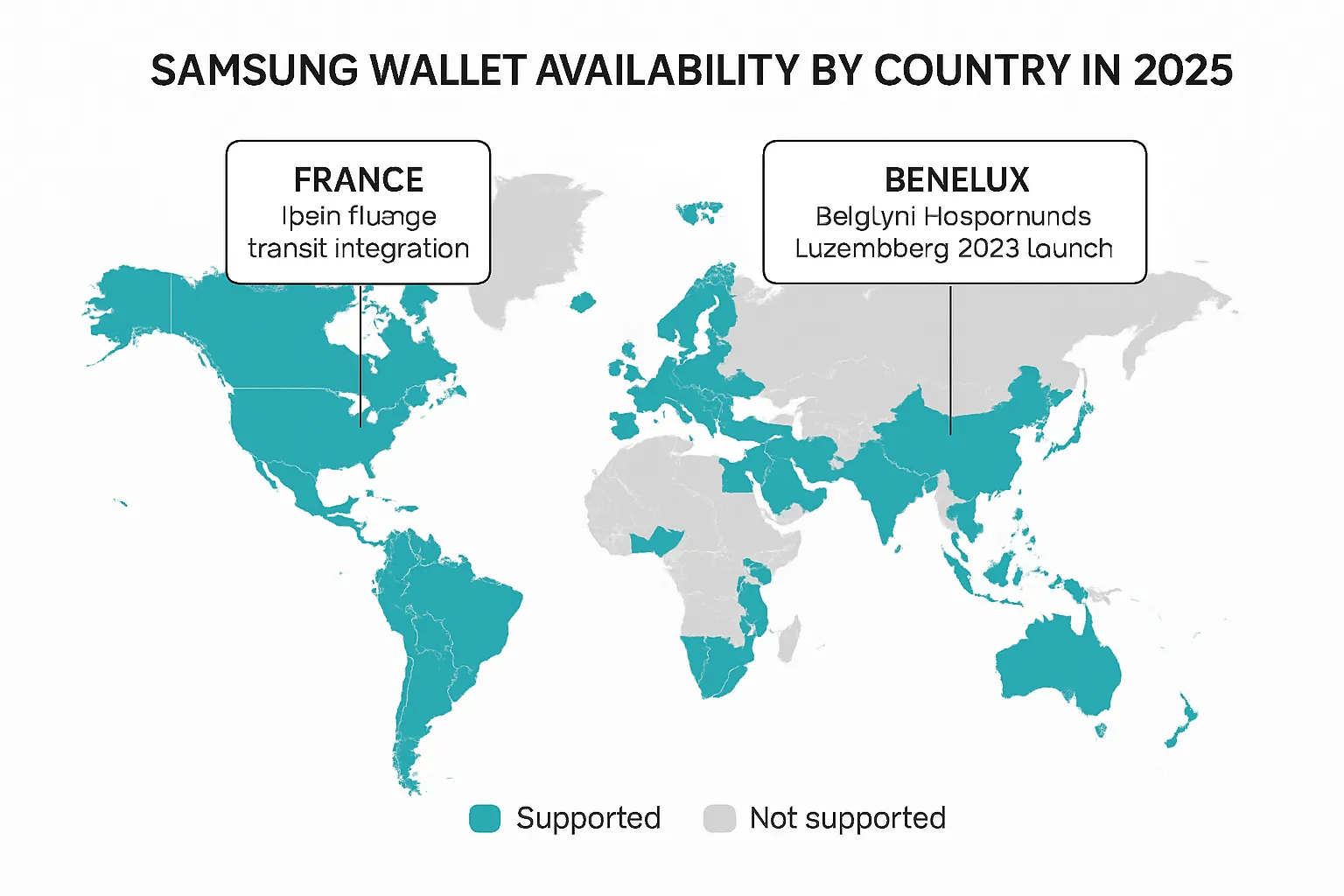
Country-by-country availability (2025)
This matrix summarizes current status and notable feature availability. Always verify with your in-market Samsung page and device CSC/region before rollout.
Country/Region | Availability status | Key features (Payments, Transit [e.g., Navigo, Octopus], IDs, Car keys) | Notes | Last known update |
|---|---|---|---|---|
Australia | Available | Payments; Transit (open-loop in supported cities); Car keys | Launched via 2023 expansion; features vary by bank and city | 2023-01 |
Bahrain | Available | Payments | Part of 13-market expansion | 2022-10 |
Belgium (Benelux) | Rolling out | Payments; Wallet passes; Car keys (select models) | Launch starting Feb 7, 2025; One UI 7 required initially | 2025-02 |
Brazil | Available | Payments; Wallet passes | 2023 expansion | 2023-01 |
Canada | Available | Payments; Wallet passes; Car keys (select models) | 2023 expansion | 2023-01 |
China (Mainland) | Available | Payments; Transit (Beijing/Shanghai/China T-Union variants); IDs (select) | Transit cards are region-locked; device region must match | 2022-06 |
Denmark | Available | Payments; Wallet passes | 13-market expansion | 2022-10 |
Finland | Available | Payments; Wallet passes | 13-market expansion | 2022-10 |
France | Available | Payments; Transit (Navigo/IDFM); Boarding passes (Air France and partners); Car keys | Navigo via IDFM; boarding pass support varies by airline/airport | 2024-06 |
Germany | Available | Payments; Wallet passes; Car keys | Initial launch cohort | 2022-06 |
Hong Kong | Available | Payments; Transit (Octopus/Smart Octopus); Wallet passes | Octopus region-locked; requires HK setup | 2023-01 |
India | Available | Payments; Wallet passes; Travel/entertainment bookings | Partner integrations (e.g., Paytm) for tickets | 2024-06 |
Italy | Available | Payments; Wallet passes | Initial launch cohort | 2022-06 |
Kazakhstan | Available | Payments; IDs (national ID via QR) | National ID support announced Oct 2024 | 2024-10 |
Korea (South) | Available | Payments; Transit (T-money/Cashbee); IDs (Government24); Car keys | Some IDs via QR/NFC; features historically under Samsung Pay | 2024-03 |
Kuwait | Available | Payments | 13-market expansion | 2022-10 |
Luxembourg (Benelux) | Rolling out | Payments; Wallet passes; Car keys (select models) | Launch starting Feb 7, 2025; One UI 7 required initially | 2025-02 |
Malaysia | Available | Payments; Wallet passes | 2023 expansion | 2023-01 |
Netherlands (Benelux) | Rolling out | Payments; Wallet passes; Car keys (select models) | Launch starting Feb 7, 2025; One UI 7 required initially | 2025-02 |
New Zealand | Available | Payments; Wallet passes | Availability varies by bank | 2024 |
Norway | Available | Payments; Wallet passes | 13-market expansion | 2022-10 |
Oman | Available | Payments | 13-market expansion | 2022-10 |
Qatar | Available | Payments; Wallet passes | 13-market expansion | 2022-10 |
Saudi Arabia | Available | Payments; Wallet passes | Availability per Samsung/Wikipedia rollouts | 2024 |
Singapore | Available | Payments; Transit (SimplyGo/open-loop); Wallet passes | Transit support via open-loop EMV and SimplyGo acceptance | 2023-01 |
South Africa | Available | Payments; Wallet passes | 13-market expansion | 2022-10 |
Spain | Available | Payments; Wallet passes | Initial launch cohort | 2022-06 |
Sweden | Available | Payments; Wallet passes | 13-market expansion | 2022-10 |
Switzerland | Available | Payments; Wallet passes | 13-market expansion | 2022-10 |
Taiwan | Available | Payments; Wallet passes | 2023 expansion | 2023-01 |
United Arab Emirates | Available | Payments; IDs (Dubai RTA driver/vehicle licenses); Wallet passes | Dubai RTA IDs added July 2024 | 2024-07 |
United Kingdom | Available | Payments; Transit (TfL open-loop); Wallet passes; Car keys | Tap payment at TfL; bank support varies | 2022-06 |
United States | Available | Payments; IDs (select states mDL); Wallet passes; Car keys | Airline boarding pass support varies; state ID rollout ongoing | 2024-10 |
Vietnam | Available | Payments; Wallet passes | 13-market expansion | 2022-10 |
Note: This matrix is a guide. Feature availability varies by bank, transit operator, issuer, airport, device model, One UI version, and device CSC/region.
New and notable (2024–2025)
France: Île‑de‑France Mobilités (Navigo) support and Air France boarding passes
Navigo (IDFM) integration brings seamless transit access across the Île‑de‑France region on compatible Galaxy devices, plus Add to Wallet boarding passes for Air France and partner flights where supported.
"By integrating all-new travel management features into Samsung Wallet, we are bringing new levels of convenience to French locals as well as to visitors to France." - Source
Benelux: Launch timing and requirements
Belgium, Netherlands, Luxembourg: Launch beginning February 7, 2025, aligned with newer One UI 7 builds (initially on Galaxy S25 series, then rolling out to additional devices as updates land). Expect continued European expansion and new local partners.
How to confirm local support
Check your in‑market Samsung Wallet page: Search “Samsung Wallet [Country]” on samsung.com for supported banks, cards, and features.
Verify device CSC/region: Samsung Wallet availability follows device region. A mismatch can block features like transit cards or IDs.
Look for “Add to Samsung Wallet” on partner sites: Airlines, transit operators, and venues increasingly offer Add to Wallet buttons. If visible for your region, those passes typically work on supported Galaxy devices.
Devices and OS requirements: Galaxy phones, Wear OS, and One UI
Selecting the right hardware and software stack ensures a smooth Samsung Wallet rollout at scale. Use this guide to match Galaxy devices and One UI versions to the features you plan to deploy - and to plan any Samsung Wallet update waves needed across your fleet. This helps maximize Samsung Wallet availability while keeping the Samsung version of Wallet consistent across locations.
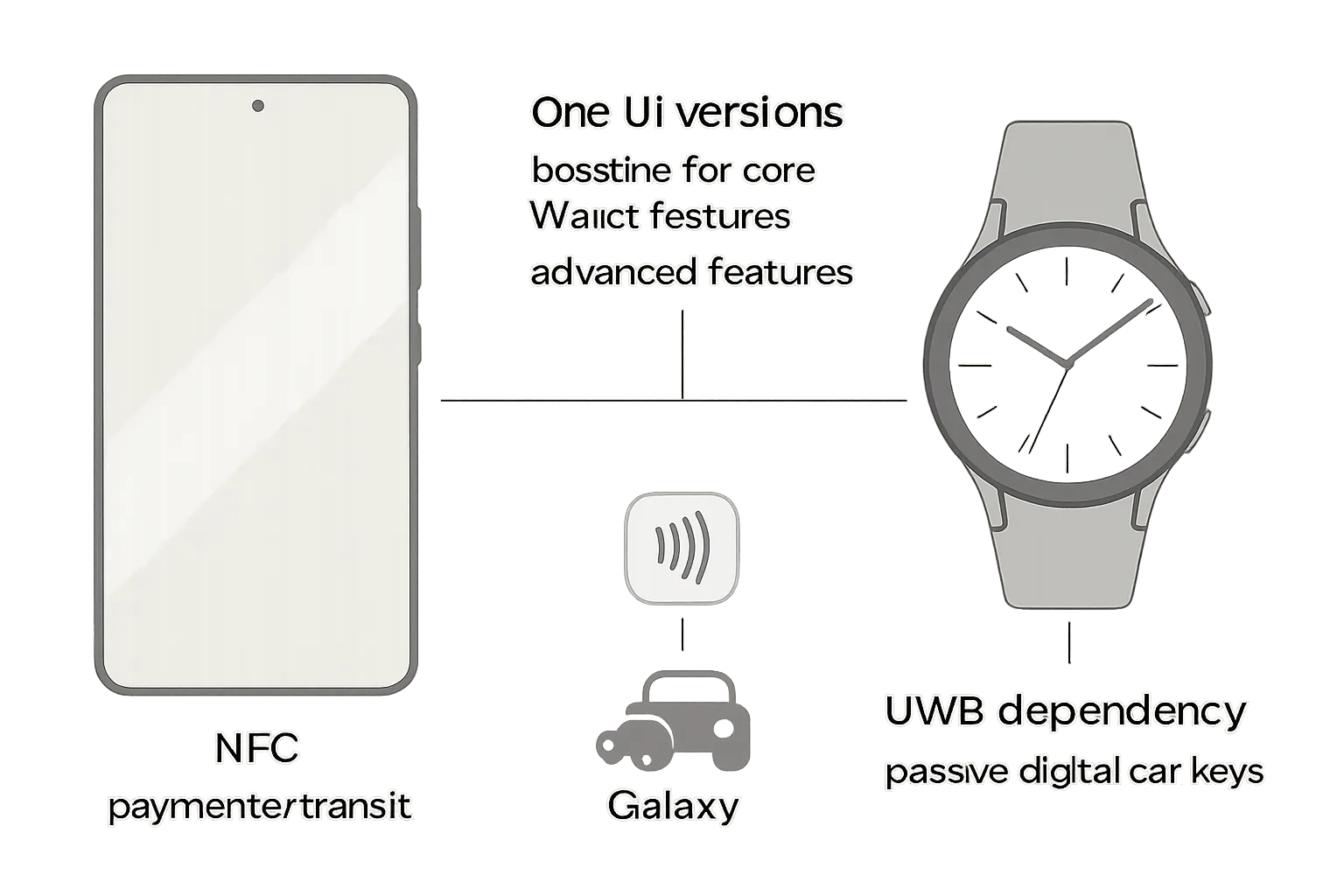
Minimum device criteria
Galaxy devices with NFC:
NFC is required for in‑store tap payments, many transit experiences, and digital keys (NFC-based).
Ensure your device CSC/region matches a supported Samsung Wallet market; region mismatches can limit features like transit or IDs.
Samsung Wallet app requirements:
Install/update from Galaxy Store. If Wallet is missing, confirm region support, sign in with a Samsung Account, and update system software before retrying.
One UI baseline:
Core features (payments, passes, loyalty, boarding passes) are best supported on recent One UI builds (One UI 5+ recommended).
Advanced features (digital car keys, certain transit Fast Mode behaviors) require newer Android/One UI. Car keys generally require Android 12+ and compatible hardware.
Wearables
Wear OS support:
Galaxy Watch6 and later on Wear OS support Samsung Wallet with partial feature parity vs. phones.
Strong coverage for payments, boarding passes, and loyalty/memberships.
Limitations: Digital IDs are limited on wearables (e.g., select state IDs only), and digital car/home keys are typically phone-only.
Note: Battery reserve behavior differs on watches (see Advanced capabilities).
Advanced capabilities
UWB for passive entry (digital car keys):
Passive entry/exit and precise ranging require Ultra‑Wideband (UWB) on compatible Galaxy models.
Supported examples include Galaxy Z Fold2 and later, and Plus/Ultra models of Galaxy S21 and later for enhanced functionality; model and market availability varies by automaker.
Battery reserve and Fast Mode caveats:
On phones, Fast Mode cards (e.g., car keys, transit, campus/company IDs) can function for a period after the device powers off from a drained battery (power reserve window). Availability and duration depend on device and issuer.
Galaxy Watch models do not support this battery‑depletion retention; plan primary access via phone if you rely on Fast Mode after power-off.
Feature support by device/OS
Device family/model range | Minimum Android/One UI | NFC required | UWB required (for passive car entry) | Feature availability (Payments, Transit, IDs, Digital Keys) | Notes |
|---|---|---|---|---|---|
Galaxy S20 and newer (incl. FE) | Android 12+ (One UI 5+ recommended) | Yes | Not on S20 series; see later models for UWB | Payments, Transit (region-specific), IDs (market-specific), Digital Keys (NFC-only where supported) | Advanced car keys may require newer hardware; ensure device CSC matches supported market. |
Galaxy S21 (Plus/Ultra) and newer flagship S-series | Android 12+ (One UI 5+; One UI 7 for latest regions) | Yes | Yes on Plus/Ultra (passive entry on supported cars) | Payments, Transit, IDs (market-specific), Digital Keys (NFC/UWB on supported cars) | Benelux launch initially on One UI 7; bank/issuer availability varies by country. |
Galaxy Z Fold2 and newer | Android 12+ (One UI 5+ recommended) | Yes | Yes (Fold2+) for passive entry on supported cars | Payments, Transit, IDs (market-specific), Digital Keys (NFC/UWB) | Larger screen ideal for travel passes; feature availability depends on region and car model. |
Galaxy Z Flip 5G and newer | Android 12+ (One UI 5+ recommended) | Yes | Select models only | Payments, Transit, IDs (market-specific), Digital Keys (NFC; UWB where available) | Check specific Flip model for UWB; car manufacturer support varies. |
Galaxy Note20 / Note20 Ultra | Android 12+ (One UI 5+ recommended) | Yes | Note20 Ultra includes UWB | Payments, Transit, IDs (market-specific), Digital Keys (NFC/UWB on Note20 Ultra) | Older flagship still viable; confirm app and bank support. |
Galaxy A-series with NFC (various models) | Android 12+ (One UI 5+ recommended) | Yes | No | Payments, Transit (open-loop where supported), IDs (select markets), Digital Keys (NFC-only when supported) | Midrange devices support core features; advanced keys may be limited. |
Galaxy Watch6 / Watch6 Classic and newer (Wear OS) | Wear OS on Watch6+ | Yes (for payments) | No | Payments, Transit (select use cases), Boarding/Loyalty; IDs limited; Digital Keys not supported | Partial feature parity vs. phone; no battery-reserve Fast Mode on watch. |
Deployment tip: For new market launches (e.g., Benelux), ensure devices are updated to the latest One UI (often One UI 7 initially), then push a Samsung Wallet update from Galaxy Store. This helps align feature behavior and minimizes regional edge cases tied to CSC/region and firmware.
Feature availability by region: Payments, transit, IDs, digital keys
Samsung Wallet combines payments, passes, IDs, and digital keys in one secure app on Galaxy devices. Availability and feature sets vary by country, issuer, and device model. Use this guide to align your rollout with local requirements and ensure a smooth Samsung Wallet update strategy across regions.
Payments
EMV contactless payments are powered by Samsung Pay within Samsung Wallet. Support depends on your market’s participating banks and card networks (Visa, Mastercard, etc.). In most supported countries, customers can tap to pay wherever contactless is accepted.
Activation requirements:
Galaxy device with NFC, a Samsung account, and an in‑market CSC/region that matches a supported country.
The latest Samsung Wallet update via Galaxy Store and current One UI build for best compatibility.
Notes for multi-location brands:
Acquirer/terminal support: Most modern terminals that accept contactless EMV will work; however, certain merchant category or issuer controls can affect approvals.
Wearables: Galaxy Watch on Wear OS supports wrist payments in many markets; bank coverage may differ from phones.
Transit
Where it shines:
France (Île‑de‑France/Paris): Navigo via Île‑de‑France Mobilités on compatible phones, plus tap‑to‑pay in additional French cities that support open‑loop EMV at gates and validators.
Hong Kong: Octopus/Smart Octopus functionality is available to locally supported devices; it is region‑locked and not transferable across regions.
Korea: T‑Money and Cashbee are supported on eligible Galaxy devices configured for the local region.
Singapore: Tap with supported debit/credit cards on SimplyGo/open‑loop readers; features vary by card and bank.
Open‑loop cities: In markets like the UK (TfL), the US (e.g., New York MTA, Chicago, Portland), Australia (NSW), and others, many systems allow “Tap & Pay” with EMV cards provisioned in Wallet.
Cross‑region limitations to plan for:
Transit cards are typically region‑locked. You generally cannot purchase or use a transit card from one country on a device configured for another region.
Purchasing rules: Some systems require devices to be purchased or configured for the transit system’s home region. A notable exception is France’s Navigo, which is widely purchasable when Wallet is supported in your region, but still subject to country exclusions and operator rules.
Wearable parity: Boarding passes and membership/loyalty often work on watch; deep transit features may be phone‑first.
One UI/firmware gating: Newer transit integrations may require recent One UI versions; ensure corporate devices are updated before field deployment.
IDs and credentials
Government IDs and certificates:
United States: Mobile driver’s licenses/state IDs are available in select states within Samsung Wallet. Coverage is expanding; verify your state’s participation and acceptance points (TSA checkpoints, state services, etc.).
South Korea: Government24 digital credentials (e.g., driver’s license, resident card, insurance/pension certificates) are supported in Wallet, typically presented via QR/NFC depending on the credential.
United Arab Emirates (Dubai): Driving and vehicle licenses can be stored and presented from Samsung Wallet.
Kazakhstan: National identity card support is available with offline presentation via QR.
Practical deployment notes:
Acceptance varies by verifier (government offices, airports, venues). Train staff on what is accepted locally.
Wearable support is limited for IDs. Phones provide the most reliable experience for ID presentation.
Device region (CSC) and One UI version can govern eligibility; confirm region and keep devices up to date.
Digital keys (car/home)
Automotive keys:
Supported brands and models vary by market, model year, and feature set. Broadly, manufacturers such as BMW, Mini, Volvo, Polestar, Audi (select 2024+ models), Kia, and Hyundai support digital keys on eligible vehicles.
Technology requirements:
NFC unlock/drive: Works on many recent Galaxy phones with NFC.
Passive entry/exit and enhanced features: Require Ultra‑Wideband (UWB) on compatible Galaxy devices (e.g., Z Fold2 and later; Plus/Ultra models in the S21+ generation and newer) and a vehicle that supports UWB.
Sharing and access policies are controlled by the automaker app/issuer; consult brand‑specific documentation for setup and guest keys.
Home/enterprise access:
Select smart lock and access control partners support Wallet‑based credentials. Capabilities differ by region and lock model; NFC is typical, with presentation from the phone.
Battery reserve and Fast Mode:
On supported phones, Fast Mode allows certain passes (transit, campus/company IDs, car keys) to function for a period after battery depletion in power‑reserve mode. Specific behavior and duration can vary by device and issuer.
Galaxy Watch models do not retain Fast Mode access after battery depletion; plan primary entry via phone for mission‑critical use.
Implementation takeaway for brands:
Confirm samsung wallet availability per country before launching campaigns.
Standardize on recent One UI builds and mandate the Samsung Wallet update during provisioning.
Align offers and pass types to local capabilities - payments and open‑loop transit where universal, region‑specific transit cards where available, and IDs or car keys where accepted.
Samsung Wallet update and rollout timeline (2022–2025)
Track how Samsung Wallet has evolved and where it’s headed next. Use this timeline to plan your Samsung Wallet update processes and align go‑to‑market plans with regional feature availability.
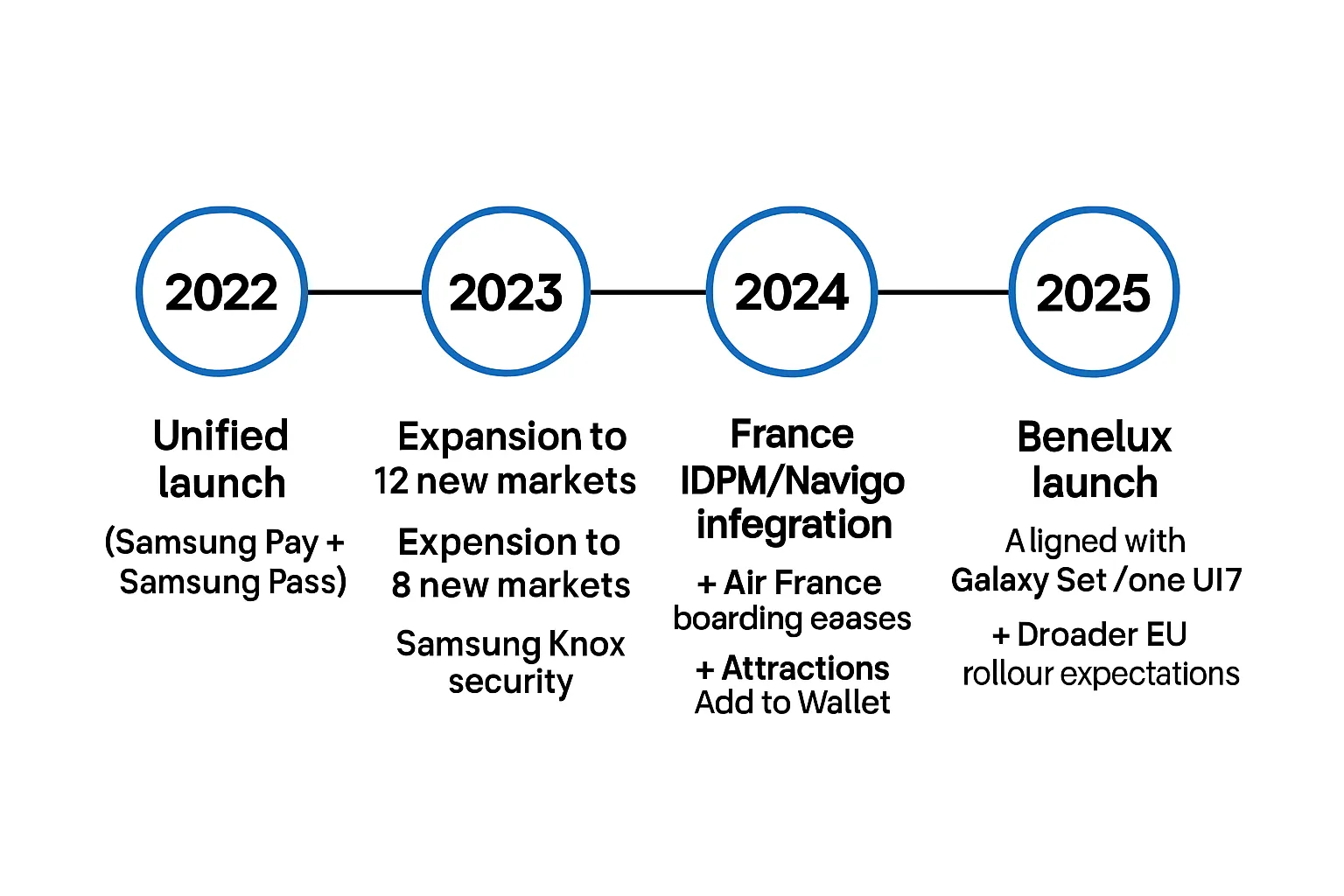
2022
Unified launch of Samsung Wallet, bringing Samsung Pay and Samsung Pass together under a single app experience for payments, passes, and credentials.
2023
Expansion to 13 new markets, followed by 8 additional markets announced soon after, significantly increasing samsung wallet availability across Europe, the Middle East, Asia, Africa, and the Americas.
Security emphasis: Samsung Knox highlighted for hardware‑backed protection, biometrics, and isolated storage for sensitive documents.
2024
France: Île‑de‑France Mobilités (Navigo) integration on compatible Galaxy devices and Add to Wallet for Air France and partner flights; increased “Add to Samsung Wallet” across leading attractions and venues in France ahead of peak travel season.
2025
Benelux (Belgium, Netherlands, Luxembourg): Launch beginning February 7, aligned with new Galaxy devices and One UI 7 builds; indication of a broader EU rollout cadence as device updates propagate.
"Because we strongly believe in open ecosystems, it is our ambition to continue expanding Samsung Wallet with new local partners and developers. More news about that soon!" - Source
What’s next
Continued partner ecosystem growth: Expect more local banks, transit agencies, airlines, and ID issuers to add “Add to Samsung Wallet” compatibility.
Geographic expansion: Signals point to additional European markets and deeper feature parity across existing regions as One UI 7 lands on more devices.
Business readiness checklist:
Standardize on the latest One UI across your fleet and include a Samsung Wallet update step in provisioning.
Align campaigns to local capabilities: EMV payments and open‑loop transit where universal; region‑locked transit, IDs, and digital keys where supported.
Monitor in‑market Samsung pages and partner announcements (banks, airlines, transit operators) for coverage changes and new “Add to Wallet” endpoints.
Missing Samsung Wallet? How to update or enable it
When Samsung Wallet doesn’t appear or key features are disabled, follow this checklist to resolve issues quickly and ensure samsung wallet availability on your device. These steps also help IT teams push a consistent Samsung Wallet update across managed fleets.
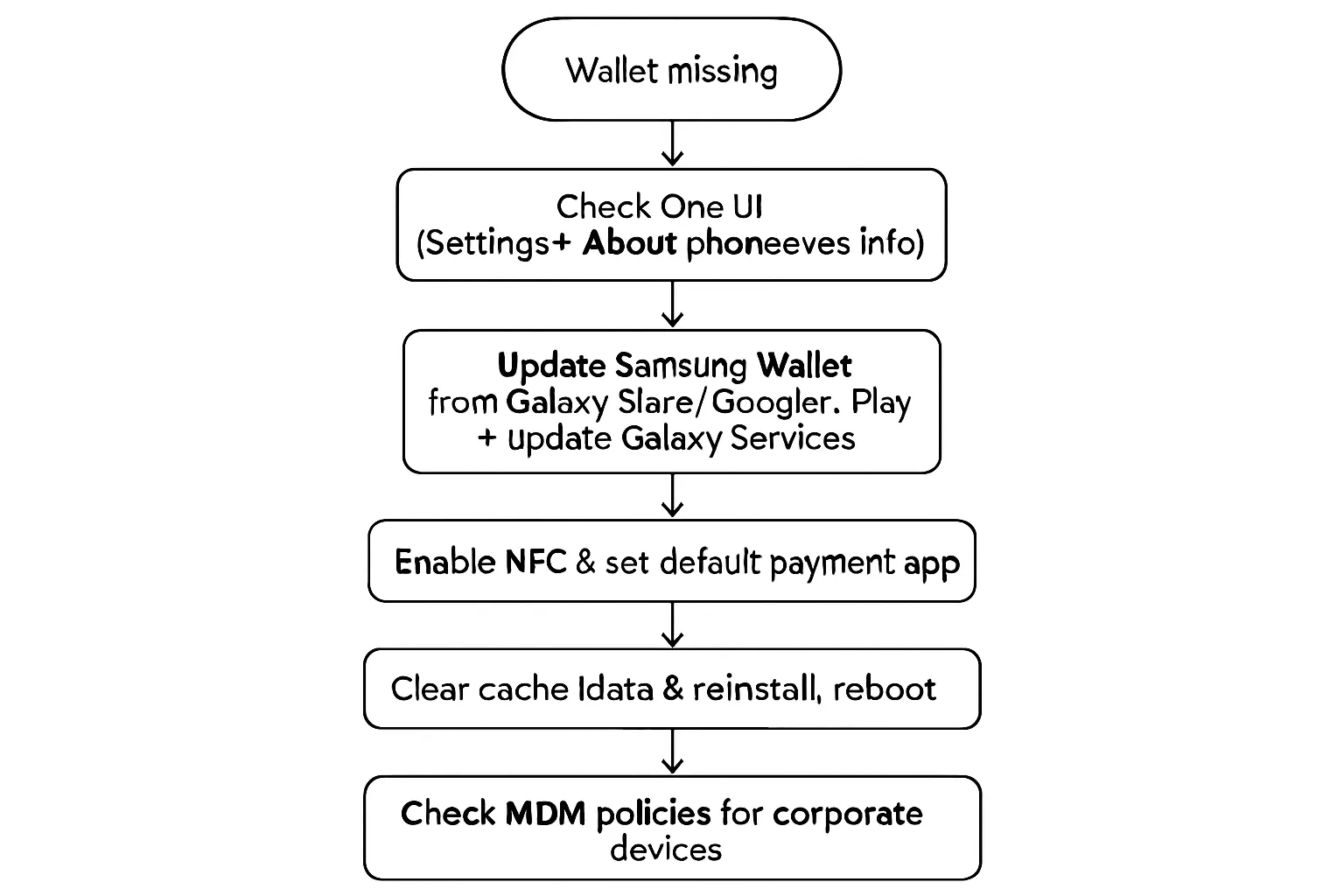
Step-by-step checklist
Confirm device and One UI version
Go to Settings > About phone > Software information.
Update to the latest One UI and Android version for full feature compatibility.
Update Samsung Wallet and Galaxy Services
Open Galaxy Store (preferred) > search “Samsung Wallet” > Update.
Update “Samsung Pay/Pass” if shown - they merge into Wallet.
Open Google Play > update “Galaxy Services” and any Samsung Core Services.
Sign in to your Samsung account and retry the update.
Check region/CSC alignment
Confirm your device CSC/region matches a supported Samsung Wallet country.
If you relocated, insert a local SIM, restart, and check for region prompts or a carrier configuration update.
Some features (transit cards/IDs) are region‑locked and require local region settings.
Enable NFC and set default payment app
Settings > Connections > NFC and contactless payments > On.
Tap Contactless payments > set Samsung Wallet as default (or “Tap & Pay” preference).
Test at a contactless terminal that supports EMV.
Clear cache/data and reinstall if corrupted
Settings > Apps > Galaxy Store and Samsung Wallet > Storage > Clear cache (and data if needed).
Uninstall and reinstall Samsung Wallet from Galaxy Store.
Reboot the phone and sign in again.
Corporate/managed devices (MDM)
Verify your MDM profile allows Samsung Wallet, NFC payments, and Galaxy Store updates.
Whitelist package names and ensure Kiosk/Work Profile policies do not block Wallet or background services.
If your country isn’t supported yet
What still works while traveling
Tap & Pay on open‑loop systems: In many cities globally (e.g., TfL London, New York MTA), you can ride transit with a payment card provisioned in Wallet where EMV is accepted.
Boarding passes and event tickets: If an airline or venue provides “Add to Samsung Wallet,” you can usually store and present passes when abroad, subject to airline/airport acceptance rules.
Loyalty and memberships: Many passes can be added and scanned via barcodes/QR where supported by the merchant.
When to expect availability
Follow Samsung Global Newsroom for market announcements and local samsung.com country pages for bank, transit, and ID coverage.
Monitor carrier updates and One UI rollouts; some new markets (e.g., Benelux 2025) initially require the latest One UI builds before broad device support lands.
For brands: Turning Samsung Wallet into a revenue channel (with Loyaltee)
Wallet-first engagement transforms casual customers into repeat buyers - without the overhead of building or promoting an app. With Samsung Wallet availability expanding and the Samsung version of Wallet tightly integrated on Galaxy devices, brands can drive measurable revenue using passes as always-on touchpoints.
"Wallet push notifications regularly achieve 50%+ open rates, driving measurable re-engagement." - Source
Why Wallet-first engagement works
App-free onboarding reduces friction
Customers add a digital card or coupon in seconds - no login flow, no app install - raising opt-in rates and accelerating time-to-value.
Persistent visibility on the phone
Passes live in Samsung Wallet (and Google Wallet), so your brand remains a tap away at purchase moments.
Direct, measurable channel
Targeted push notifications reach customers at the right time/place and are tied to redemptions and spend - closing the loop on ROI.
Lower cost to scale
Replace plastic cards and printed coupons with dynamic Wallet passes that update in real time.
High-impact use cases
Retail and QSR
Loyalty cards and points balance
Digital stamp/punch cards
Coupons and limited-time vouchers
Basket-size boosters: bounce-back offers, BOGO, “next-visit” perks
Membership and fitness
Digital membership IDs, renewal reminders, reactivation offers
Class credits and time-bound passes
Hospitality and travel
Boarding passes and event tickets with upgrade/upsell prompts
On-property offers: F&B, spa, late checkout, partner perks
Multi-location brands
Geo-targeted pushes per store radius
Regional menus/pricing and location-specific campaigns
How Loyaltee helps
Create once, deploy everywhere
Build fully branded Wallet passes for Samsung Wallet and Google Wallet in minutes - logos, colors, dynamic fields, barcodes/QR, and templates.
Real-time lifecycle orchestration
Update balances, tiers, and expiry automatically; trigger offer swaps based on behavior or time windows.
Targeting and AI timing
Segment by location, visit frequency, spend, and product affinity; use AI to optimize send time and cadence for higher conversions.
Direct, measurable impact
Attribute redemptions and revenue to each push; monitor store-level lift and campaign ROI in real time.
Integrations and APIs
Developer-friendly APIs for card updates and push notifications; webhooks to sync with POS, CDP, CRM, and ecommerce.
Governance and scale
Enterprise-grade roles, audit trails, and privacy; simple, transparent pricing from SMB to global rollouts.
Get started in minutes. Turn Samsung Wallet and Google Wallet into a high-converting, app-free revenue channel with Loyaltee: https://loyaltee.xyz/
Implementation guide: Launching Samsung and Google Wallet passes with Loyaltee
Turn Samsung Wallet and Google Wallet into a unified, app‑free revenue channel. This guide shows how to launch quickly, integrate deeply, and operate at scale - while accounting for samsung wallet availability differences across regions and devices.
Quick start (no-code)
Pick a template
Choose from Loyalty, Coupon, Voucher, Membership, or Event.
Apply your brand: logo, colors, fonts, hero image.
Configure fields: member name/ID, points/balance, tier, expiry, barcode/QR, T&Cs, location(s), and support links.
Define redemption format
Barcode/QR: select symbologies (EAN-13, Code128, QR) per POS requirements.
Add “Scan to Redeem” and cashier prompts to reduce friction.
Publish in minutes
Generate mobile-friendly “Add to Wallet” buttons (Samsung + Google) and pass links.
Distribute via:
SMS with deep links
Email (campaigns, receipts, confirmations)
Website banners, PDP/cart/checkout, account area
QR codes at POS, packaging, table tents, or DOOH
Conversion best practices
Use a one‑tap CTA (“Add to Wallet”) above the fold.
Offer an instant incentive (bonus points or first‑visit discount).
Keep forms minimal; capture extra data post‑add via progressive profiling.
Advanced (with APIs)
Connect your data
POS/CRM/CDP integration to sync balances, points, tiers, and offer eligibility.
Pass updates on lifecycle events (join, purchase, redemption, tier change).
Automate lifecycle and pushes
Triggered updates: low balance, expiring points, new tier benefits.
Targeted push notifications from the pass: lapse prevention, drive‑time nudges, order ready, event reminders.
Use AI timing to optimize send windows by user behavior and store hours.
Webhooks for visibility and control
Subscribe to events: pass added, opened, redeemed, expired, uninstalled.
Personalize at scale: swap layouts/fields by segment, location, or inventory.
Secure operations
Role‑based permissions and audit logging.
Rate limits and retry logic for bulk updates.
Monitor API health and redemptions in real time.
Regional readiness
Respect samsung wallet availability by market
Offer both Samsung and Google Wallet pass options by default.
Provide a fallback (mobile web barcode) if a wallet isn’t supported on the device.
Test in‑country before launch
Use local SIM/CSC where needed; verify currency, date formats, and language.
Validate barcode compatibility and tax/receipt flows at POS.
For travel/transit/ID‑adjacent passes, confirm local acceptance rules and any issuer caveats.
Localize and comply
Multi-language templates; region‑specific T&Cs, VAT/GST and legal copy.
Honor privacy and consent norms (GDPR, TCPA, CAN‑SPAM); capture opt‑ins with clear value exchange.
Measure and optimize
Core KPIs
Add rate: views to adds (by channel and placement).
Active passes: cards in Wallet over time.
Redemption rate and discount ROI: per store, region, and segment.
Revenue lift and repeat visit frequency vs. baseline.
Experimentation and targeting
A/B test incentive value, expiry windows, and callouts.
Geo‑targeted offers within store radius; dayparted pushes aligned to peak demand.
Lapse reactivation: time‑since‑last‑visit triggers with escalating value.
Operational cadence
Include a Samsung Wallet update step in device provisioning for staff or in‑store tablets.
Refresh seasonal templates and automate sunset/renewal of campaigns.
Monitor inboxing and push delivery; adjust frequency to avoid fatigue.
Go from idea to live in hours. With Loyaltee, you can build branded, dynamic passes for both the Samsung version of Wallet and Google Wallet, plug them into your data stack, and start driving measurable retention and revenue - without building an app.
FAQs: Samsung version of Wallet, updates, and regional features
What is Samsung’s version of Wallet? How is it different from Google Wallet?
Samsung Wallet is Samsung’s unified wallet app for Galaxy devices (One UI), combining payments (Samsung Pay) with passes, IDs, and digital keys. Like Google Wallet, it supports EMV tap-to-pay, loyalty, coupons, and boarding passes. Key differences: Samsung Wallet is optimized for Galaxy hardware, protected by Samsung Knox, and offers deep features like digital car keys (including UWB-based passive entry on select devices). Google Wallet is cross‑Android. Brands should support both to maximize reach.
Does Samsung Wallet replace Samsung Pay and Samsung Pass?
Yes. Since 2022, the unified Samsung Wallet app has absorbed Samsung Pay (payments) and Samsung Pass (passwords/credentials). In supported markets, the legacy Pay/Pass apps update into Samsung Wallet via Galaxy Store.
Which phones and watches are supported, and what One UI version do I need?
Phones: Recent Galaxy devices with NFC. For broad compatibility, run One UI 5+; for the newest regional launches and features, One UI 7 may be required (e.g., early Benelux rollout in 2025). Digital car keys generally require Android 12+, NFC, and for passive entry, a UWB‑capable Galaxy (e.g., S21+ / Ultra and newer, Z Fold2+ where supported).
Watches: Galaxy Watch6 and later on Wear OS support Wallet with partial feature parity - payments, loyalty, and boarding passes are supported; IDs are limited; car/home keys are phone‑first.
Is Samsung Wallet available in my country? What about recent launches like Benelux?
Samsung Wallet availability varies by market. Coverage includes most of North America, much of Europe (including France, DACH, Nordics, UK, Spain, Italy), the Middle East (UAE, Qatar, Kuwait, Oman, Bahrain), Asia (Korea, China, Hong Kong, India, Malaysia, Singapore, Taiwan, Vietnam), Brazil, and Australia - with Benelux rolling out from February 2025 (initially requiring One UI 7 on supported devices). To confirm local support, check your country’s Samsung Wallet page and ensure your device CSC/region matches.
Can I use transit cards from another region (e.g., Octopus/Navigo) on my device?
Typically no. Transit cards are region‑locked and must be added and used on devices configured for that region (CSC/region alignment). Open‑loop Tap & Pay with a payment card in Wallet often works across many cities globally (e.g., TfL London, New York MTA), but region‑specific closed‑loop cards (e.g., Octopus, T‑Money) are restricted. Navigo in France has broader purchase options when Wallet is supported, but it still carries operator and region caveats.
Are mobile IDs supported in my state/country?
ID support is expanding. Examples include select U.S. states (mobile driver’s licenses), South Korea (Government24 credentials), Dubai/UAE (driver and vehicle licenses), and Kazakhstan (national ID via QR). Always verify acceptance points (airports/state services) and regional requirements.
How do I update if Samsung Wallet is missing from my device?
Check One UI version (Settings > About phone > Software information) and update. 2) Update Samsung Wallet in Galaxy Store (preferred) and update Galaxy Services in Google Play. 3) Confirm device region/CSC matches a supported country and insert a local SIM if you relocated. 4) Enable NFC and set Samsung Wallet as the default contactless app. 5) Clear cache/data, reinstall, then reboot. 6) On corporate/MDM devices, ensure policies allow Wallet, NFC, and Galaxy Store updates. See our dedicated troubleshooting section for details.
Can my business add “Add to Samsung Wallet” to our site or app?
Yes. With Loyaltee, you can create Samsung Wallet and Google Wallet passes in minutes and publish Add to Wallet buttons and links for the web, SMS, email, apps, and QR codes in‑store. For deeper integration, Loyaltee’s APIs and webhooks update balances, tiers, and offers in real time and send targeted Wallet push notifications - giving you a measurable, app‑free revenue channel while maximizing samsung wallet availability.
Conclusion: Start leveraging Samsung Wallet with Loyaltee
You now have a clear view of samsung wallet availability, device and One UI requirements for Galaxy phones and Wear OS, and how key features - payments, transit, IDs, and digital keys - roll out by region. You also know how to run a Samsung Wallet update if it’s missing and how to validate local support before launch.
Next step for brands: turn the Samsung version of Wallet into an app‑free revenue channel. Launch unified Wallet passes that work across Samsung Wallet and Google Wallet to increase retention, repeat visits, and basket size - without building an app or changing your POS.
With Loyaltee, you can:
Create fully branded loyalty, coupon, voucher, and membership passes in minutes
Sync real‑time balances, tiers, and offers via APIs and webhooks
Send targeted, high‑engagement push notifications and measure revenue impact end‑to‑end
Ready to go live? Explore templates, pricing, and APIs, and get your first pass launched in minutes. Visit https://loyaltee.xyz/ to get started.